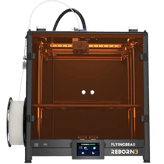
Flying Bear 3D Printer S1 Facts: 154 Specifications & 34 Highlights
Get the facts before you unbox. The Flying Bear 3D Printer S1 3d printer features 154 key specs & features, with warranty period, weight, max extruder temperature & supported filament types topping the list.
 Supermod
 Moderator
Highlights 34
No extras. Just what matters.Why is Flying Bear 3D Printer S1 better than other 3d printers ?
Build Specifications
Scroll down for more factsMaterials & Compatibility
Scroll down for more factsPrint Speed & Performance
Scroll down for more factsHardware Features
- Provides Filament Runout Sensor
- Comes With Cooling Fans
- Supports Vibration Compensation
- Features Touchscreen Display
- Offers Lighting Inside Chamber
- Removable Build Plate
- Supports Auto Bed Leveling
- Allows Manual Bed Calibration
- Supports Filament Runout Sensor
Connectivity & Software
- Supports Remote Monitoring
- Supports Mobile App
- Firmware Update Available
- Supports Cloud-Based Software
- Supports Remote Firmware Update
Safety & Compliance
Scroll down for more factsMaintenance & Upgrades
Scroll down for more factsEnterprise Monitoring & Sensors
- Provides Remote Error Alerts
- Supports Filament Jam Detection
- Provides Bed Temperature Sensors
- Provides Print Log Storage
Quick Take
The essentials that matter—nothing extraA fast snapshot of the Flying Bear 3D Printer S1, covering its standout specification and what you can expect right out of the box.

Flying Bear 3D Printer S1
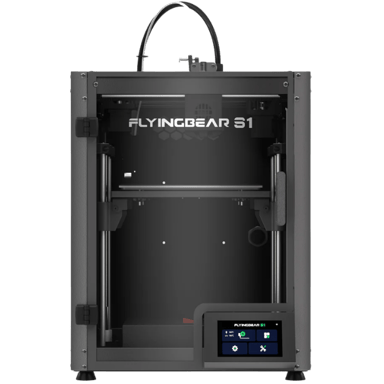
The Flying Bear S1 is a high-speed desktop 3D printer built with a sturdy CoreXY structure to ensure fast and stable printing. It comes nearly fully assembled, allowing you to start creating physical objects from digital designs almost immediately after opening the box. With advanced features like automatic bed leveling and a user-friendly touchscreen, it is designed to provide professional-grade results while remaining easy for beginners to operate.
Quick Specs Breakdown
The key specs that actually matter—no fluff, no guessworkHere’s a streamlined view of the Flying Bear 3D Printer S1 key specifications. Compare critical features at a glance before exploring the full specs and hands-on insights below.
What is the warranty period?
What type of printer is it?
What is the printer’s weight?
What is the build-to-printer size ratio?
What is the max extruder temperature?
What is the build volume?
What filament types are supported?
What is the maximum supported filament diameter?
What is the operating temperature range?
What is the required power supply voltage?
What type of build plate does it have?
What is the motion system?
What file transfer methods are supported?
What file formats are supported?
Does it have an emergency stop button?
How many safety sensors are included?
What is the overhang performance?
What is the print success rate?
Does it have auto resin mixing?
Is it compatible with post-processing equipment?
What upgrade options are supported?
What is the service interval?
Does it support multi-user profiles?
Does it support remote access control?
How many sensors are included?
Does it provide remote error alerts?
Specifications & Facts 154
Specs measured. Drama avoided.We went full nerd on the Flying Bear 3D Printer S1 3d printer. All specs included, plus how it stacks up against others in the 3d printers category. You vote the winner.
General Information 11

Flying Bear 3D Printer S1 Warranty Period
What is the warranty period?
0 Flying Bear 3D Printer S1 0 Votes 1 Year
3D Printer in this range Who knows?

Flying Bear 3D Printer S1
Warranty period is 1 Year.
Confirm warranty terms with the vendor for coverage details and service procedures.
Coverage period offered by the manufacturer.
Flying Bear 3D Printer S1 Printer Type
What type of printer is it?
0 Flying Bear 3D Printer S1 0 Votes FDM/FFF
3D Printer in this range Who knows?
Defines the printing technology used by the machine.
Flying Bear 3D Printer S1 Product Name
What is the product name?
0 Flying Bear 3D Printer S1 0 Votes Flying Bear 3D Printer S1
3D Printer in this range Who knows?
The commercial name of the 3D printer.
Flying Bear 3D Printer S1 Supported Applications
What applications are supported?
0 Flying Bear 3D Printer S1 0 Votes Prototyping
3D Printer in this range Who knows?
Lists the most common applications supported.
Flying Bear 3D Printer S1 Target User Level
What is the target user level?
0 Flying Bear 3D Printer S1 0 Votes Intermediate
3D Printer in this range Who knows?
Indicates the recommended skill level.
Flying Bear 3D Printer S1 Assembly Type
What is the assembly type?
0 Flying Bear 3D Printer S1 0 Votes Prebuilt
3D Printer in this range Who knows?
Shows whether the printer is sold as a kit requiring assembly or fully prebuilt.
Dimensions & Weight 10
Flying Bear 3D Printer S1 Weight
What is the printer’s weight?
3D Printer in this range Who knows?
Flying Bear 3D Printer S1
Unit weight is 364 lbs, which is 165.10 kg.
Knowing the gross weight is useful for shipping estimates and determining if your bench or cart can safely support the printer.
Net weight of the printer.
Flying Bear 3D Printer S1 Build-to-Printer Size Ratio
What is the build-to-printer size ratio?
3D Printer in this range Who knows?
The efficiency ratio of build volume relative to the overall printer size.
Flying Bear 3D Printer S1 Width
What is the printer’s width?
3D Printer in this range Who knows?
Flying Bear 3D Printer S1
Printer width (footprint) is 16.93 inch, or 42.99 cm.
Use this to plan workspace clearance and positioning.
The total external width of the printer.
Flying Bear 3D Printer S1 Depth
What is the printer’s depth?
3D Printer in this range Who knows?
Flying Bear 3D Printer S1
Device depth (footprint) is 16.54 inch, or 42.01 cm.
Consider this when placing the printer on a bench or inside an enclosure.
The total external depth of the printer.
Flying Bear 3D Printer S1 Package Width
What is the package width?
3D Printer in this range Who knows?
Flying Bear 3D Printer S1
Package width is 18.9 inch (boxed width 48.01 cm).
Helpful when arranging transport or storage space.
Width of the printer’s packaging.
Flying Bear 3D Printer S1 Package Depth
What is the package depth?
3D Printer in this range Who knows?
Flying Bear 3D Printer S1
Package depth is 18.11 inch (boxed depth 46.00 cm).
Useful for assessing transport and storage footprint.
Depth of the printer’s packaging.
Environmental & Power 9
Flying Bear 3D Printer S1 Operating Temperature Range
What is the operating temperature range?
0 Flying Bear 3D Printer S1 0 Votes 41–86°F
3D Printer in this range Who knows?
Flying Bear 3D Printer S1
Operating ambient range is 41–86°F, which converts to 5–30°C.
Keeping room temperature within this range helps ensure consistent print quality and reliable electronics operation.
Recommended ambient temperature range for safe operation.
Flying Bear 3D Printer S1 Power Supply Voltage
What is the required power supply voltage?
0 Flying Bear 3D Printer S1 0 Votes 100-240 Volt
3D Printer in this range Who knows?
Voltage input supported by the printer’s power supply.
Flying Bear 3D Printer S1 Storage Temperature Range
What is the storage temperature range?
0 Flying Bear 3D Printer S1 0 Votes 32–104°F
3D Printer in this range Who knows?
Flying Bear 3D Printer S1
Storage temperature range is 32–104°F, equal to 0–40°C.
Store the unit within these bounds to avoid thermal stress on components during long-term storage.
Safe temperature range for storing the printer when not in use.
Flying Bear 3D Printer S1 Power Supply Type
What type of power supply does it use?
0 Flying Bear 3D Printer S1 0 Votes Internal
3D Printer in this range Who knows?
Indicates whether the printer uses an internal or external power supply.
Flying Bear 3D Printer S1 Power Consumption
What is the power consumption?
3D Printer in this range Who knows?
Average power usage during active printing.
Flying Bear 3D Printer S1 Energy Saving Mode
Does it have energy saving mode?
No
0
Votes
Flying Bear 3D Printer S1
3D Printer in this range Who knows?
Whether the printer includes an energy-saving or eco mode.
Build Specifications 20
Flying Bear 3D Printer S1 Max Extruder Temperature
What is the max extruder temperature?
3D Printer in this range Who knows?
Flying Bear 3D Printer S1
572°F is the stated maximum extruder temperature; this corresponds to 300°C.
Run temperatures up to this level allow printing higher-temperature engineering filaments when the hotend and nozzle are rated accordingly.
Maximum heating capability of extruder.
Flying Bear 3D Printer S1 Build Volume
What is the build volume?
3D Printer in this range Who knows?
Flying Bear 3D Printer S1
Build volume is 737 cubic in, which is about 12.08 L.
That volume gives a practical sense of the maximum part size the printer can accommodate.
total printable volume capacity.
Flying Bear 3D Printer S1 Build Width
What is the build width?
3D Printer in this range Who knows?
Flying Bear 3D Printer S1
Build width is 8.66 inch, which equals 21.99 cm.
This is the usable X-axis print area for parts and bed planning.
Maximum printable width of the build area.
Flying Bear 3D Printer S1 Build Depth
What is the build depth?
3D Printer in this range Who knows?
Flying Bear 3D Printer S1
Build depth is 8.66 inch (usable Y-axis) which equals 21.99 cm.
Combine this with build width/height to understand the overall printable envelope.
Maximum printable depth of the build area.
Flying Bear 3D Printer S1 Build Height
What is the build height?
3D Printer in this range Who knows?
Flying Bear 3D Printer S1
Build height is 9.84 inch, equal to 24.99 cm.
This maximum Z height defines the tallest single-piece you can print.
Maximum printable height of the build area.
Flying Bear 3D Printer S1 Max Bed Temperature
What is the max bed temperature?
3D Printer in this range Who knows?
Flying Bear 3D Printer S1
Max bed temperature is 248°F, equivalent to 120°C.
A bed capable of this temperature supports printing materials that require higher bed temps for adhesion.
Maximum heated bed temperature.
Materials & Compatibility 11
Flying Bear 3D Printer S1 Supported Filament Types
What filament types are supported?
0 Flying Bear 3D Printer S1 0 Votes PLA, ABS, TPU, PETG
3D Printer in this range Who knows?
Flying Bear 3D Printer S1
Supported filament types listed are PLA, ABS, TPU, and PETG.
This covers the common consumer and flexible materials for prototyping and functional parts.
Filament materials that the printer can process.
Flying Bear 3D Printer S1 Max Supported Filament Diameter
What is the maximum supported filament diameter?
3D Printer in this range Who knows?
Maximum filament diameter that can be used.
Flying Bear 3D Printer S1 Filament Dry Box
Does it support filament dry boxes?
No
0
Votes
Flying Bear 3D Printer S1
3D Printer in this range Who knows?
Supports use of a dry box to prevent filament moisture issues.
Flying Bear 3D Printer S1 Filament Auto-Loading
Does it have filament auto-loading?
Yes 0 Votes Flying Bear 3D Printer S1
3D Printer in this range Who knows?
Automatic feeding of filament into extruder.
Flying Bear 3D Printer S1 Filament Drying Required
Is filament drying required?
Yes 0 Votes Flying Bear 3D Printer S1
3D Printer in this range Who knows?
Whether drying filament before use is necessary.
Flying Bear 3D Printer S1 Multi-Material Printing
Can it print with multiple materials?
No
0
Votes
Flying Bear 3D Printer S1
3D Printer in this range Who knows?
Ability to print with multiple materials simultaneously.
Print Speed & Performance 15
Flying Bear 3D Printer S1 Overhang Performance
What is the overhang performance?
3D Printer in this range Who knows?
Maximum angle of unsupported overhangs achievable.
Flying Bear 3D Printer S1 Print Success Rate
What is the print success rate?
3D Printer in this range Who knows?
Percentage of prints successfully completed.
Flying Bear 3D Printer S1 Official Max Print Speed
What is the official max print speed?
3D Printer in this range Who knows?
Flying Bear 3D Printer S1
Official maximum print speed is 500 mm/s.
Actual usable speed depends on print settings, filament, and part detail; this is the upper capability rather than typical print speed.
Manufacturer-claimed maximum print speed.
Flying Bear 3D Printer S1 Measured Effective Print Speed
What is the effective measured print speed?
3D Printer in this range Who knows?
Flying Bear 3D Printer S1
Measured effective print speed is 300 mm/s.
This value is useful when estimating job duration for different layer heights and print geometries.
Independently measured real-world print speed.
Flying Bear 3D Printer S1 Continuous Print Time
What is the max continuous print time?
3D Printer in this range Who knows?
Flying Bear 3D Printer S1
Continuous print time is rated at 72 hours.
This indicates the printer can run long jobs over multiple days, but monitor for material and maintenance needs during extended runs.
Maximum supported printing time without interruption.
Flying Bear 3D Printer S1 Time to Print Benchy
How long does it take to print a Benchy?
3D Printer in this range Who knows?
Average time to complete the benchmark “Benchy” model.
Hardware Features 20
Flying Bear 3D Printer S1 Build Plate Type
What type of build plate does it have?
0 Flying Bear 3D Printer S1 0 Votes PEI, Magnetic, Spring Sheet
3D Printer in this range Who knows?
Flying Bear 3D Printer S1
Supported build plate types include PEI, Magnetic, and Spring Sheet surfaces.
Different surfaces affect adhesion and print removal; choose based on material and post-processing preferences.
Type of build surface material.
Flying Bear 3D Printer S1 Motion System
What is the motion system?
0 Flying Bear 3D Printer S1 0 Votes Belts, Linear Rails
3D Printer in this range Who knows?
Mechanical motion system guiding the print head.
Flying Bear 3D Printer S1 Screen Size
What is the display screen size?
3D Printer in this range Who knows?
Flying Bear 3D Printer S1
Screen size is 4.3 Inch, equivalent to 10.92 cm diagonally.
A larger touchscreen improves usability for job control and local diagnostics.
Size of the display screen.
Flying Bear 3D Printer S1 Frame Type
What is the frame type?
0 Flying Bear 3D Printer S1 0 Votes CoreXY
3D Printer in this range Who knows?
Mechanical structure style of the printer.
Flying Bear 3D Printer S1 Enclosure
Is the printer open or enclosed?
0 Flying Bear 3D Printer S1 0 Votes Closed
3D Printer in this range Who knows?
Whether the printer has an open or enclosed build chamber.
Flying Bear 3D Printer S1 Filament Runout Sensor
Does it have a filament runout sensor?
Yes 0 Votes Flying Bear 3D Printer S1
3D Printer in this range Who knows?
Detects when filament runs out and pauses printing.
Connectivity & Software 13
Flying Bear 3D Printer S1 File Transfer Method
What file transfer methods are supported?
0 Flying Bear 3D Printer S1 0 Votes USB, Wi-Fi, TF Card
3D Printer in this range Who knows?
Flying Bear 3D Printer S1
File transfer methods available are USB, Wi-Fi, and TF Card.
Multiple transfer options provide flexibility for local and networked workflows.
Methods available to transfer files to the printer.
Flying Bear 3D Printer S1 Supported File Formats
What file formats are supported?
0 Flying Bear 3D Printer S1 0 Votes STL, OBJ, DAE, AMF, G-code
3D Printer in this range Who knows?
File types accepted for printing.
Flying Bear 3D Printer S1 Remote Monitoring
Does it support remote monitoring?
Yes 0 Votes Flying Bear 3D Printer S1
3D Printer in this range Who knows?
Flying Bear 3D Printer S1
Remote monitoring is available, enabling oversight of print jobs and status from another device.
This can reduce the need for constant physical supervision and helps catch issues early.
Ability to monitor prints remotely via app or web.
Flying Bear 3D Printer S1 Mobile App
Does it support a mobile app?
Yes 0 Votes Flying Bear 3D Printer S1
3D Printer in this range Who knows?
Flying Bear 3D Printer S1
A mobile app is available to interact with the printer for job control and monitoring.
Mobile control simplifies managing prints when you're away from the printer.
Ability to use a mobile app for control/monitoring.
Flying Bear 3D Printer S1 Firmware Update
Does the printer support firmware updates?
Yes 0 Votes Flying Bear 3D Printer S1
3D Printer in this range Who knows?
Flying Bear 3D Printer S1
Firmware updates are supported, allowing the device to receive fixes and new features.
Keeping firmware up to date helps maintain stability and compatibility with slicers and accessories.
Indicates whether the printer supports firmware updates; important for new features and bug fixes.
Flying Bear 3D Printer S1 Connectivity Options
What connectivity options are available?
0 Flying Bear 3D Printer S1 0 Votes USB, Wi-Fi
3D Printer in this range Who knows?
Available connection types for file transfer and control.
Resin Workflow 5
Flying Bear 3D Printer S1 Auto Resin Mixing
Does it have auto resin mixing?
No
0
Votes
Flying Bear 3D Printer S1
3D Printer in this range Who knows?
Whether resin is automatically mixed during operation for consistency.
Flying Bear 3D Printer S1 Post-Processing Equipment Compatibility
Is it compatible with post-processing equipment?
Yes 0 Votes Flying Bear 3D Printer S1
3D Printer in this range Who knows?
Whether the printer supports integration with wash/cure stations.
Flying Bear 3D Printer S1 UV Light Source Type
What UV light source type does it use?
0 Flying Bear 3D Printer S1 0 Votes None
3D Printer in this range Who knows?
Type of UV light source used to cure resin layers.
Flying Bear 3D Printer S1 Resin Cartridge System
Does it use a resin cartridge system?
No
0
Votes
Flying Bear 3D Printer S1
3D Printer in this range Who knows?
Whether it uses a sealed resin cartridge system for easy handling.
Flying Bear 3D Printer S1 Resin Heating System
Does it have a resin heating system?
No
0
Votes
Flying Bear 3D Printer S1
3D Printer in this range Who knows?
Whether the printer can heat resin for optimal viscosity.
Safety & Compliance 10
Flying Bear 3D Printer S1 Emergency Stop Button
Does it have an emergency stop button?
Yes 0 Votes Flying Bear 3D Printer S1
3D Printer in this range Who knows?
Flying Bear 3D Printer S1
An emergency stop button is present to immediately halt motion and heating for safety.
This provides a quick way to stop the machine in hazardous situations.
Dedicated button to stop the printer instantly in emergencies.
Flying Bear 3D Printer S1 Safety Sensors Count
How many safety sensors are included?
0 Flying Bear 3D Printer S1 0 Votes 3
3D Printer in this range Who knows?
Number of safety sensors installed in the printer.
Flying Bear 3D Printer S1 Safety Certifications
What safety certifications does it have?
0 Flying Bear 3D Printer S1 0 Votes CE, FCC, RoHS
3D Printer in this range Who knows?
Official safety standards the printer complies with.
Flying Bear 3D Printer S1 Enclosure Lock
Does it have an enclosure lock?
No
0
Votes
Flying Bear 3D Printer S1
3D Printer in this range Who knows?
Prevents accidental access to the chamber while printing.
Flying Bear 3D Printer S1 Fireproof Build Plate
Does it have a fireproof build plate?
No
0
Votes
Flying Bear 3D Printer S1
3D Printer in this range Who knows?
Build plate is resistant to fire for extra safety.
Flying Bear 3D Printer S1 Overheat Protection
Does it feature overheat protection?
Yes 0 Votes Flying Bear 3D Printer S1
3D Printer in this range Who knows?
Shuts down printer when components exceed safe temps.
Maintenance & Upgrades 10
Flying Bear 3D Printer S1 Upgrade Options
What upgrade options are supported?
0 Flying Bear 3D Printer S1 0 Votes Camera, Enclosure
3D Printer in this range Who knows?
Supported upgrade kits and modules for expanding functionality.
Flying Bear 3D Printer S1 Service Interval
What is the service interval?
3D Printer in this range Who knows?
Recommended time between major servicing.
Flying Bear 3D Printer S1 Nozzle Replaceable
Is the nozzle replaceable?
Yes 0 Votes Flying Bear 3D Printer S1
3D Printer in this range Who knows?
Specifies if the nozzle can be replaced with different sizes or when worn.
Flying Bear 3D Printer S1 Spare Parts Availability
Are spare parts available?
Yes 0 Votes Flying Bear 3D Printer S1
3D Printer in this range Who knows?
Whether spare parts are readily available for purchase.
Flying Bear 3D Printer S1 Supported Mod Kits
What mod kits are supported?
0 Flying Bear 3D Printer S1 0 Votes Enclosure, None
3D Printer in this range Who knows?
Officially supported modification kits.
Flying Bear 3D Printer S1 Self-Diagnostics
Does it have self-diagnostics?
Yes 0 Votes Flying Bear 3D Printer S1
3D Printer in this range Who knows?
Printer can analyze itself for common faults and errors.
Business & Professional Features 10
Flying Bear 3D Printer S1 Multi-User Profiles
Does it support multi-user profiles?
No
0
Votes
Flying Bear 3D Printer S1
3D Printer in this range Who knows?
Allows multiple users to have distinct profiles and permissions.
Flying Bear 3D Printer S1 Remote Access Control
Does it support remote access control?
Yes 0 Votes Flying Bear 3D Printer S1
3D Printer in this range Who knows?
Ability to control printer access remotely with permissions.
Flying Bear 3D Printer S1 Print Farm Management
Does it support print farm management?
No
0
Votes
Flying Bear 3D Printer S1
3D Printer in this range Who knows?
Indicates if multiple printers can be networked and managed as a farm.
Flying Bear 3D Printer S1 Cloud Fleet Management
Does it support cloud fleet management?
No
0
Votes
Flying Bear 3D Printer S1
3D Printer in this range Who knows?
Ability to manage multiple devices remotely via cloud software.
Flying Bear 3D Printer S1 Workflow Integration
Does it integrate with workflows?
No
0
Votes
Flying Bear 3D Printer S1
3D Printer in this range Who knows?
Integration with professional workflow tools and design platforms.
Flying Bear 3D Printer S1 Enterprise Security Features
Does it have enterprise security features?
No
0
Votes
Flying Bear 3D Printer S1
3D Printer in this range Who knows?
Advanced security measures like encryption, secure login, and permissions.
Enterprise Monitoring & Sensors 10
Flying Bear 3D Printer S1 Sensor Count
How many sensors are included?
0 Flying Bear 3D Printer S1 0 Votes 5
3D Printer in this range Who knows?
total number of sensors installed in the printer.
Flying Bear 3D Printer S1 Remote Error Alerts
Does it provide remote error alerts?
Yes 0 Votes Flying Bear 3D Printer S1
3D Printer in this range Who knows?
Sends error notifications to remote devices.
Flying Bear 3D Printer S1 Filament Jam Detection
Does it support filament jam detection?
Yes 0 Votes Flying Bear 3D Printer S1
3D Printer in this range Who knows?
Flying Bear 3D Printer S1
Filament jam detection is supported and will pause prints and alert the user if a blockage is detected.
This reduces failed prints and risk of extruder damage by allowing intervention when jams occur.
Detects blockages or jams in the filament path.
Flying Bear 3D Printer S1 Bed Temperature Sensors
Does it have bed temperature sensors?
Yes 0 Votes Flying Bear 3D Printer S1
3D Printer in this range Who knows?
Detects and regulates the build plate temperature.
Flying Bear 3D Printer S1 Chamber Temperature Sensors
Does it have chamber temperature sensors?
No
0
Votes
Flying Bear 3D Printer S1
3D Printer in this range Who knows?
Tracks and maintains chamber temperature for consistent prints.
Flying Bear 3D Printer S1 Extruder Pressure Sensor
Does it have an extruder pressure sensor?
No
0
Votes
Flying Bear 3D Printer S1
3D Printer in this range Who knows?
Monitors extrusion pressure to prevent under- or over-extrusion.
Surveys
Because hot takes deserve votes.Flying Bear 3D Printer S1 Printing Speed
How would you rate the printing speed of this 3D printer?
Flying Bear 3D Printer S1 Print Quality and Detail
How would you describe the print quality and level of detail produced by this 3D printer?
Flying Bear 3D Printer S1 Build Volume Capacity
How do you find the build volume capacity of this 3D printer?
Flying Bear 3D Printer S1 Material Consumption Efficiency
How efficient is this 3D printer in using filament or resin materials?
Flying Bear 3D Printer S1 Noise Level
How noisy is this 3D printer during operation?
Flying Bear 3D Printer S1 Durability and Lifespan
How durable does this 3D printer seem in terms of lifespan?
Flying Bear 3D Printer S1 Performance
How would you rate the overall performance of this 3D printer in terms of print quality and reliability?
Flying Bear 3D Printer S1 Ease of Setup
How easy was the setup process for this 3D printer?
Flying Bear 3D Printer S1 Pricing
How would you rate the pricing for this 3D printer?
Flying Bear 3D Printer S1 Design Appeal
How would you rate the design appeal of this 3D printer?
Guides 1
Yes, we brought proof.Videos 1
Quick Start Guide: Flying Bear 3D Printer S1 for First-Time Users
Reviews 0
The good, the bad, and the brutally honest.Average Rating

Discussions 0
Thoughts, takes, and hot debates.Awards 0
Only the best made it here.Collections 0
Treasures You’ve picked. No fluff, all fun.More 3D Printers 2
Unlock more awesome finds.3D Printers like Flying Bear 3D Printer S1 1




Other Flying Bear 3D Printer 3D Printers 1